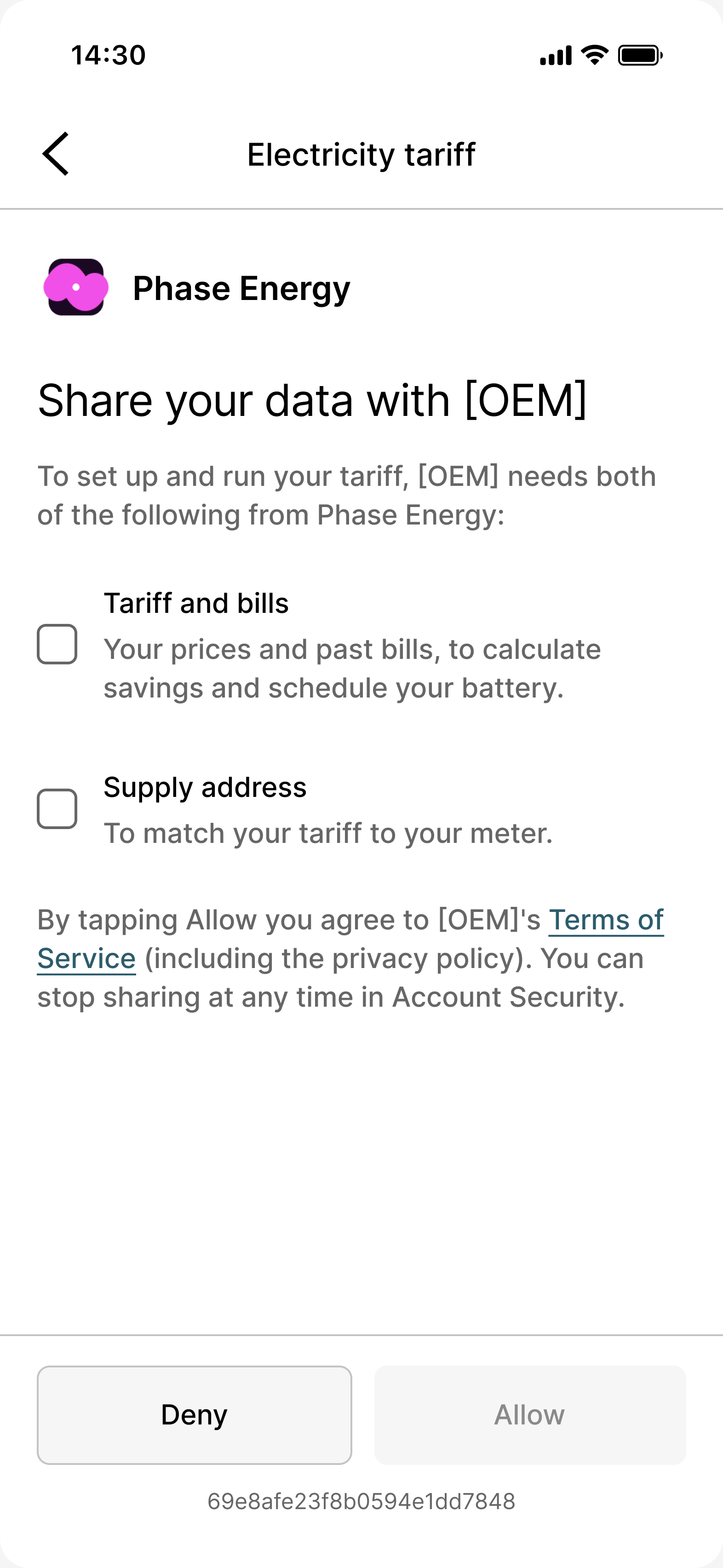
For energy suppliers: let customers connect their tariff in Connect by signing in with you.
This page is for energy suppliers. With a DIRECT integration, a customer connects their tariff by signing in with you, and Flatpeak then reads the tariff from your systems.Flatpeak builds the integration against your authentication method and data format; OAuth with long-lived tokens works best. It typically takes 2 to 4 weeks, followed by 2 weeks of testing. To start, contact integrations@flatpeak.com. If you do not integrate, Flatpeak can still list your tariffs in its library.
The endpoints on this page are partner endpoints, which are not in the Energy API reference. Flatpeak gives you credentials for them during onboarding.
Authorize access
1
Receive the redirect
When the customer selects you as their supplier, their app opens your authentication URI with a connect_session, a time-limited token for the session:
Flatpeak reads the tariff from your systems with the credentials in auth_data, typically every 1 to 2 days. You set the polling frequency you allow and how tokens renew. Return, in your own format:
The customer’s tariff, covering at least the next 24 hours.
The contract start date. Flatpeak uses it to backfill tariff history.
The contract end date, optional. Flatpeak uses it to remind the customer to reconnect before the tariff expires.
Was this page helpful?
{"docsConfig":{"theme":"mint","$schema":"https://mintlify.com/docs.json","name":"Flatpeak","colors":{"primary":"#0D9373","light":"#55D799","dark":"#0D9373"},"logo":{"light":"https://mintcdn.com/flatpeak-d495c19e/2B6nWUU4-c2pSD3E/images/shared/flatpeak-logo-new-dark.png?fit=max\u0026auto=format\u0026n=2B6nWUU4-c2pSD3E\u0026q=85\u0026s=b3eb2629b2f6d7ac5813f2fc130d3b98","dark":"https://mintcdn.com/flatpeak-d495c19e/2B6nWUU4-c2pSD3E/images/shared/flatpeak-logo-new-light.png?fit=max\u0026auto=format\u0026n=2B6nWUU4-c2pSD3E\u0026q=85\u0026s=79bc7b47f8f54f7b623a2aa0522d5dce","href":"/"},"favicon":"https://mintcdn.com/flatpeak-d495c19e/2B6nWUU4-c2pSD3E/favicon.png?fit=max\u0026auto=format\u0026n=2B6nWUU4-c2pSD3E\u0026q=85\u0026s=f21ca4406e76bd3d6900999d5c9f1510","navbar":{"links":[{"href":"/support","label":"Support"}],"primary":{"type":"button","label":"Console","href":"https://console.flatpeak.com"}},"footer":{"socials":{"github":"https://github.com/flat-peak","linkedin":"https://www.linkedin.com/company/flatpeak"}},"fonts":{"heading":{"family":"NB International Pro","source":"https://flatpeak-static.s3.amazonaws.com/misc/fonts/nbinternationalpro-bold-webfont.woff2","format":"woff2"},"body":{"family":"NB International Pro","source":"https://flatpeak-static.s3.amazonaws.com/misc/fonts/nbinternationalpro-regular-webfont.woff2","format":"woff2"}},"styling":{"eyebrows":"section","codeblocks":"system","latex":false},"integrations":{"ga4":{"measurementId":"G-2ZGZW08N65"}},"navigation":{"pages":[]}},"deployment":{"deploymentMetadataValue":{"subdomain":"flatpeak-d495c19e","hasAudioNarration":false,"actualSubdomain":"flatpeak-d495c19e","customDomains":[],"gitSource":{"type":"github","owner":"flat-peak","repo":"busbar-docs","deployBranch":"main","contentDirectory":"","isPrivate":true,"mountPath":"","label":"","_id":"6af588a42092b9c7b91cf695"},"feedback":{"thumbs":true},"entitlements":{"AI_CHAT":{"status":"ENABLED"},"WEB_MCP":{"status":"ENABLED"},"NARRATION":{"status":"ENABLED"}},"buildId":"6af783c51bcf9df148926cf0","clientVersion":"0.0.4131","searchFilterCounts":[{"language":"default","tag":"API Reference","count":155},{"language":"default","tag":"Energy API","count":116},{"language":"default","tag":"Fleet API","count":88},{"language":"default","tag":"Platform","count":51},{"language":"default","tag":"Guides","count":49},{"language":"default","tag":"Tariffs","count":45},{"language":"default","tag":"VPP","count":45},{"language":"default","tag":"Enroll customers","count":26},{"language":"default","tag":"Connect","count":23},{"language":"default","tag":"VPP events","count":16}]},"assistantConfig":{"enableAskAiButton":false,"enableStarterQuestions":false,"enableContextualStarterQuestions":false,"enableAskAiSearchBar":true},"basePath":"/docs","hasChatPermissions":true,"hasWebMcpPermissions":true,"toggles":[{"name":"kill-isr","enabled":true,"variant":{"name":"disabled","enabled":false,"feature_enabled":true},"impressionData":false},{"name":"custom-rbac-roles","enabled":true,"variant":{"name":"disabled","enabled":false,"feature_enabled":true},"impressionData":false},{"name":"agent-mintlify-slack","enabled":true,"variant":{"name":"disabled","enabled":false,"feature_enabled":true},"impressionData":false},{"name":"agent-integrations-settings","enabled":true,"variant":{"name":"disabled","enabled":false,"feature_enabled":true},"impressionData":false},{"name":"rbac-expansion","enabled":true,"variant":{"name":"disabled","enabled":false,"feature_enabled":true},"impressionData":false},{"name":"automations-pr-grouping","enabled":true,"variant":{"name":"disabled","enabled":false,"feature_enabled":true},"impressionData":false},{"name":"custom-prefix","enabled":true,"variant":{"name":"disabled","enabled":false,"feature_enabled":true},"impressionData":false},{"name":"analytics-v7","enabled":true,"variant":{"name":"disabled","enabled":false,"feature_enabled":true},"impressionData":false},{"name":"user-flows-analytics","enabled":true,"variant":{"name":"disabled","enabled":false,"feature_enabled":true},"impressionData":false},{"name":"no-publish-flow","enabled":true,"variant":{"name":"disabled","enabled":false,"feature_enabled":true},"impressionData":false},{"name":"workos-onboarding","enabled":true,"variant":{"name":"disabled","enabled":false,"feature_enabled":true},"impressionData":false},{"name":"snapshot-serving-live","enabled":true,"variant":{"name":"disabled","enabled":false,"feature_enabled":true},"impressionData":false},{"name":"stripTemperatureMiddleware","enabled":true,"variant":{"name":"disabled","enabled":false,"feature_enabled":true},"impressionData":false},{"name":"support-platform-pylon-zendesk","enabled":true,"variant":{"name":"disabled","enabled":false,"feature_enabled":true},"impressionData":false},{"name":"snapshot-serving","enabled":true,"variant":{"name":"disabled","enabled":false,"feature_enabled":true},"impressionData":false},{"name":"instant-rollback","enabled":true,"variant":{"name":"disabled","enabled":false,"feature_enabled":true},"impressionData":false},{"name":"granular-notifications-server","enabled":true,"variant":{"name":"disabled","enabled":false,"feature_enabled":true},"impressionData":false},{"name":"granular-notifications","enabled":true,"variant":{"name":"disabled","enabled":false,"feature_enabled":true},"impressionData":false},{"name":"automations-fable","enabled":true,"variant":{"name":"disabled","enabled":false,"feature_enabled":true},"impressionData":false},{"name":"fixed-ai-action-pricing","enabled":true,"variant":{"name":"disabled","enabled":false,"feature_enabled":true},"impressionData":false},{"name":"automation-resolve-merge-conflict","enabled":true,"variant":{"name":"disabled","enabled":false,"feature_enabled":true},"impressionData":false},{"name":"scoped-publishing","enabled":true,"variant":{"name":"disabled","enabled":false,"feature_enabled":true},"impressionData":false},{"name":"mintql","enabled":true,"variant":{"name":"disabled","enabled":false,"feature_enabled":true},"impressionData":false},{"name":"page-level-analytics","enabled":true,"variant":{"name":"disabled","enabled":false,"feature_enabled":true},"impressionData":false},{"name":"editor-version-history-v2","enabled":true,"variant":{"name":"disabled","enabled":false,"feature_enabled":true},"impressionData":false},{"name":"billing-page-v2","enabled":true,"variant":{"name":"disabled","enabled":false,"feature_enabled":true},"impressionData":false},{"name":"full-page-search","enabled":true,"variant":{"name":"disabled","enabled":false,"feature_enabled":true},"impressionData":false},{"name":"workspace-projects","enabled":true,"variant":{"name":"disabled","enabled":false,"feature_enabled":true},"impressionData":false},{"name":"assistant-v5","enabled":true,"variant":{"name":"disabled","enabled":false,"feature_enabled":true},"impressionData":false},{"name":"fork-pr-previews","enabled":true,"variant":{"name":"disabled","enabled":false,"feature_enabled":true},"impressionData":false},{"name":"revalidation-jwt","enabled":true,"variant":{"name":"disabled","enabled":false,"feature_enabled":true},"impressionData":false},{"name":"workos-sso-scim","enabled":true,"variant":{"name":"disabled","enabled":false,"feature_enabled":true},"impressionData":false},{"name":"hobby-abuse-scan","enabled":true,"variant":{"name":"disabled","enabled":false,"feature_enabled":true},"impressionData":false},{"name":"dashboard-inbox","enabled":true,"variant":{"name":"disabled","enabled":false,"feature_enabled":true},"impressionData":false},{"name":"workos-signup","enabled":true,"variant":{"name":"disabled","enabled":false,"feature_enabled":true},"impressionData":false},{"name":"turbopuffer-dual-write","enabled":true,"variant":{"name":"disabled","enabled":false,"feature_enabled":true},"impressionData":false},{"name":"workos-enabled","enabled":true,"variant":{"name":"disabled","enabled":false,"feature_enabled":true},"impressionData":false},{"name":"approve-review-flow","enabled":true,"variant":{"name":"disabled","enabled":false,"feature_enabled":true},"impressionData":false},{"name":"editor-metadata","enabled":true,"variant":{"name":"disabled","enabled":false,"feature_enabled":true},"impressionData":false},{"name":"sso-setup-deadline-banner","enabled":true,"variant":{"name":"disabled","enabled":false,"feature_enabled":true},"impressionData":false},{"name":"turbopuffer-serve","enabled":true,"variant":{"name":"disabled","enabled":false,"feature_enabled":true},"impressionData":false},{"name":"live-agents","enabled":true,"variant":{"name":"disabled","enabled":false,"feature_enabled":true},"impressionData":false},{"name":"llms-txt-v2","enabled":true,"variant":{"name":"disabled","enabled":false,"feature_enabled":true},"impressionData":false}],"googleFontsInlined":false},"customCss":[{"filePath":"style.css","content":":not(pre)>code{white-space:nowrap}html[data-current-path=\"/\"] #navbar div:has(>.nav-tabs),html[data-current-path=\"/\"] #navbar [data-component-part=\"products-selector-trigger\"]{display:none}"}],"page":{"pagePath":"fleet-api/guides/direct-integration","slug":"/fleet-api/guides/direct-integration","pageMetadata":{"title":"Direct integration","sidebarTitle":"Direct integration","description":"For energy suppliers: let customers connect their tariff in Connect by signing in with you.","href":"/fleet-api/guides/direct-integration"},"description":{"compiledSource":"\"use strict\";\nconst {jsx: _jsx} = arguments[0];\nconst {useMDXComponents: _provideComponents} = arguments[0];\nfunction _createMdxContent(props) {\n const _components = {\n p: \"p\",\n ..._provideComponents(),\n ...props.components\n };\n return _jsx(_components.p, {\n children: \"For energy suppliers: let customers connect their tariff in Connect by signing in with you.\"\n });\n}\nfunction MDXContent(props = {}) {\n const {wrapper: MDXLayout} = {\n ..._provideComponents(),\n ...props.components\n };\n return MDXLayout ? _jsx(MDXLayout, {\n ...props,\n children: _jsx(_createMdxContent, {\n ...props\n })\n }) : _createMdxContent(props);\n}\nreturn {\n default: MDXContent\n};\n","frontmatter":{},"scope":{}},"pageType":"default","mdx":{"mdxSource":{"compiledSource":"\"use strict\";const{Fragment:_Fragment,jsx:_jsx,jsxs:_jsxs}=arguments[0];const{useMDXComponents:_provideComponents}=arguments[0];function _createMdxContent(props){const _components={a:`a`,code:`code`,li:`li`,p:`p`,pre:`pre`,span:`span`,tbody:`tbody`,td:`td`,th:`th`,thead:`thead`,tr:`tr`,ul:`ul`,..._provideComponents(),...props.components},{CodeBlock,CodeGroup,Frame,Heading,Note,OptimizedImage,Step,Steps,Table}=_components;if(!CodeBlock)_missingMdxReference(`CodeBlock`,true);if(!CodeGroup)_missingMdxReference(`CodeGroup`,true);if(!Frame)_missingMdxReference(`Frame`,true);if(!Heading)_missingMdxReference(`Heading`,true);if(!Note)_missingMdxReference(`Note`,true);if(!OptimizedImage)_missingMdxReference(`OptimizedImage`,true);if(!Step)_missingMdxReference(`Step`,true);if(!Steps)_missingMdxReference(`Steps`,true);if(!Table)_missingMdxReference(`Table`,true);return _jsxs(_Fragment,{children:[_jsxs(_components.p,{children:[`This page is for energy suppliers. With a `,_jsx(_components.code,{children:`DIRECT`}),` integration, a customer connects their tariff by signing in with you, and Flatpeak then reads the tariff from your systems.`]}),`\n`,_jsxs(_components.p,{children:[`Flatpeak builds the integration against your authentication method and data format; OAuth with long-lived tokens works best. It typically takes 2 to 4 weeks, followed by 2 weeks of testing. To start, contact `,_jsx(_components.a,{href:`mailto:integrations@flatpeak.com`,children:`integrations@flatpeak.com`}),`. If you do not integrate, Flatpeak can still list your tariffs in its library.`]}),`\n`,_jsx(Note,{children:_jsxs(_components.p,{children:[`The endpoints on this page are partner endpoints, which are not in the `,_jsx(_components.a,{href:`/energy-api/reference`,children:`Energy API`}),` reference. Flatpeak gives you credentials for them during onboarding.`]})}),`\n`,_jsx(Heading,{level:`2`,id:`authorize-access`,children:`Authorize access`}),`\n`,_jsxs(Steps,{children:[_jsxs(Step,{title:`Receive the redirect`,children:[_jsxs(_components.p,{children:[`When the customer selects you as their supplier, their app opens your authentication URI with a `,_jsx(_components.code,{children:`connect_session`}),`, a time-limited token for the session:`]}),_jsx(CodeBlock,{filename:``,numberOfLines:`1`,language:`http`,children:_jsx(_components.pre,{className:`shiki shiki-themes github-light-default dark-plus`,style:{backgroundColor:`#ffffff`,\"--shiki-dark-bg\":`#0B0C0E`,color:`#1f2328`,\"--shiki-dark\":`#D4D4D4`},language:`http`,children:_jsxs(_components.code,{language:`http`,numberOfLines:`1`,children:[_jsx(_components.span,{className:`line`,children:_jsx(_components.span,{style:{color:`#1F2328`,\"--shiki-dark\":`#D4D4D4`},children:`https://\u003cyour authentication URI>?connect_session=cos_68541c4c407600f62fd98a97`})}),`\n`]})})})]}),_jsxs(Step,{title:`Get the session context`,children:[_jsxs(CodeGroup,{children:[_jsx(CodeBlock,{filename:`Request`,numberOfLines:`3`,language:`shellscript`,children:_jsx(_components.pre,{className:`shiki shiki-themes github-light-default dark-plus`,style:{backgroundColor:`#ffffff`,\"--shiki-dark-bg\":`#0B0C0E`,color:`#1f2328`,\"--shiki-dark\":`#D4D4D4`},language:`shellscript`,children:_jsxs(_components.code,{language:`shellscript`,numberOfLines:`3`,children:[_jsxs(_components.span,{className:`line`,children:[_jsx(_components.span,{style:{color:`#953800`,\"--shiki-dark\":`#DCDCAA`},children:`curl`}),_jsx(_components.span,{style:{color:`#0550AE`,\"--shiki-dark\":`#569CD6`},children:` --request`}),_jsx(_components.span,{style:{color:`#0A3069`,\"--shiki-dark\":`#CE9178`},children:` GET`}),_jsx(_components.span,{style:{color:`#CF222E`,\"--shiki-dark\":`#D7BA7D`},children:` \\\\`})]}),`\n`,_jsxs(_components.span,{className:`line`,children:[_jsx(_components.span,{style:{color:`#0550AE`,\"--shiki-dark\":`#569CD6`},children:` --url`}),_jsx(_components.span,{style:{color:`#0A3069`,\"--shiki-dark\":`#CE9178`},children:` https://energy-api.flatpeak.com/connect/session/{connect_session}`}),_jsx(_components.span,{style:{color:`#CF222E`,\"--shiki-dark\":`#D7BA7D`},children:` \\\\`})]}),`\n`,_jsxs(_components.span,{className:`line`,children:[_jsx(_components.span,{style:{color:`#0550AE`,\"--shiki-dark\":`#569CD6`},children:` --header`}),_jsx(_components.span,{style:{color:`#0A3069`,\"--shiki-dark\":`#CE9178`},children:` 'Authorization: Basic \u003cencoded-value>'`})]}),`\n`]})})}),_jsx(CodeBlock,{filename:`Response`,numberOfLines:`20`,language:`json`,children:_jsx(_components.pre,{className:`shiki shiki-themes github-light-default dark-plus`,style:{backgroundColor:`#ffffff`,\"--shiki-dark-bg\":`#0B0C0E`,color:`#1f2328`,\"--shiki-dark\":`#D4D4D4`},language:`json`,children:_jsxs(_components.code,{language:`json`,numberOfLines:`20`,children:[_jsx(_components.span,{className:`line`,children:_jsx(_components.span,{style:{color:`#1F2328`,\"--shiki-dark\":`#D4D4D4`},children:`{`})}),`\n`,_jsxs(_components.span,{className:`line`,children:[_jsx(_components.span,{style:{color:`#116329`,\"--shiki-dark\":`#9CDCFE`},children:` \"connect_session\"`}),_jsx(_components.span,{style:{color:`#1F2328`,\"--shiki-dark\":`#D4D4D4`},children:`: `}),_jsx(_components.span,{style:{color:`#0A3069`,\"--shiki-dark\":`#CE9178`},children:`\"cos_68541c4c407600f62fd98a97\"`}),_jsx(_components.span,{style:{color:`#1F2328`,\"--shiki-dark\":`#D4D4D4`},children:`,`})]}),`\n`,_jsxs(_components.span,{className:`line`,children:[_jsx(_components.span,{style:{color:`#116329`,\"--shiki-dark\":`#9CDCFE`},children:` \"energy_flow_direction\"`}),_jsx(_components.span,{style:{color:`#1F2328`,\"--shiki-dark\":`#D4D4D4`},children:`: `}),_jsx(_components.span,{style:{color:`#0A3069`,\"--shiki-dark\":`#CE9178`},children:`\"IMPORT\"`}),_jsx(_components.span,{style:{color:`#1F2328`,\"--shiki-dark\":`#D4D4D4`},children:`,`})]}),`\n`,_jsxs(_components.span,{className:`line`,children:[_jsx(_components.span,{style:{color:`#116329`,\"--shiki-dark\":`#9CDCFE`},children:` \"live_mode\"`}),_jsx(_components.span,{style:{color:`#1F2328`,\"--shiki-dark\":`#D4D4D4`},children:`: `}),_jsx(_components.span,{style:{color:`#0550AE`,\"--shiki-dark\":`#569CD6`},children:`true`}),_jsx(_components.span,{style:{color:`#1F2328`,\"--shiki-dark\":`#D4D4D4`},children:`,`})]}),`\n`,_jsxs(_components.span,{className:`line`,children:[_jsx(_components.span,{style:{color:`#116329`,\"--shiki-dark\":`#9CDCFE`},children:` \"data\"`}),_jsx(_components.span,{style:{color:`#1F2328`,\"--shiki-dark\":`#D4D4D4`},children:`: {`})]}),`\n`,_jsxs(_components.span,{className:`line`,children:[_jsx(_components.span,{style:{color:`#116329`,\"--shiki-dark\":`#9CDCFE`},children:` \"accepted_terms\"`}),_jsx(_components.span,{style:{color:`#1F2328`,\"--shiki-dark\":`#D4D4D4`},children:`: `}),_jsx(_components.span,{style:{color:`#0550AE`,\"--shiki-dark\":`#569CD6`},children:`false`}),_jsx(_components.span,{style:{color:`#1F2328`,\"--shiki-dark\":`#D4D4D4`},children:`,`})]}),`\n`,_jsxs(_components.span,{className:`line`,children:[_jsx(_components.span,{style:{color:`#116329`,\"--shiki-dark\":`#9CDCFE`},children:` \"account\"`}),_jsx(_components.span,{style:{color:`#1F2328`,\"--shiki-dark\":`#D4D4D4`},children:`: {`})]}),`\n`,_jsxs(_components.span,{className:`line`,children:[_jsx(_components.span,{style:{color:`#116329`,\"--shiki-dark\":`#9CDCFE`},children:` \"id\"`}),_jsx(_components.span,{style:{color:`#1F2328`,\"--shiki-dark\":`#D4D4D4`},children:`: `}),_jsx(_components.span,{style:{color:`#0A3069`,\"--shiki-dark\":`#CE9178`},children:`\"acc_65e421bed29d88d9012e0662\"`}),_jsx(_components.span,{style:{color:`#1F2328`,\"--shiki-dark\":`#D4D4D4`},children:`,`})]}),`\n`,_jsxs(_components.span,{className:`line`,children:[_jsx(_components.span,{style:{color:`#116329`,\"--shiki-dark\":`#9CDCFE`},children:` \"display_name\"`}),_jsx(_components.span,{style:{color:`#1F2328`,\"--shiki-dark\":`#D4D4D4`},children:`: `}),_jsx(_components.span,{style:{color:`#0A3069`,\"--shiki-dark\":`#CE9178`},children:`\"ACME\"`}),_jsx(_components.span,{style:{color:`#1F2328`,\"--shiki-dark\":`#D4D4D4`},children:`,`})]}),`\n`,_jsxs(_components.span,{className:`line`,children:[_jsx(_components.span,{style:{color:`#116329`,\"--shiki-dark\":`#9CDCFE`},children:` \"logo_url\"`}),_jsx(_components.span,{style:{color:`#1F2328`,\"--shiki-dark\":`#D4D4D4`},children:`: `}),_jsx(_components.span,{style:{color:`#0A3069`,\"--shiki-dark\":`#CE9178`},children:`\"https://static.flatpeak.com/\u003c...>/acme.png\"`}),_jsx(_components.span,{style:{color:`#1F2328`,\"--shiki-dark\":`#D4D4D4`},children:`,`})]}),`\n`,_jsxs(_components.span,{className:`line`,children:[_jsx(_components.span,{style:{color:`#116329`,\"--shiki-dark\":`#9CDCFE`},children:` \"privacy_url\"`}),_jsx(_components.span,{style:{color:`#1F2328`,\"--shiki-dark\":`#D4D4D4`},children:`: `}),_jsx(_components.span,{style:{color:`#0A3069`,\"--shiki-dark\":`#CE9178`},children:`\"https://acme.com/privacy\"`}),_jsx(_components.span,{style:{color:`#1F2328`,\"--shiki-dark\":`#D4D4D4`},children:`,`})]}),`\n`,_jsxs(_components.span,{className:`line`,children:[_jsx(_components.span,{style:{color:`#116329`,\"--shiki-dark\":`#9CDCFE`},children:` \"support_url\"`}),_jsx(_components.span,{style:{color:`#1F2328`,\"--shiki-dark\":`#D4D4D4`},children:`: `}),_jsx(_components.span,{style:{color:`#0A3069`,\"--shiki-dark\":`#CE9178`},children:`\"https://acme.com/support\"`}),_jsx(_components.span,{style:{color:`#1F2328`,\"--shiki-dark\":`#D4D4D4`},children:`,`})]}),`\n`,_jsxs(_components.span,{className:`line`,children:[_jsx(_components.span,{style:{color:`#116329`,\"--shiki-dark\":`#9CDCFE`},children:` \"terms_url\"`}),_jsx(_components.span,{style:{color:`#1F2328`,\"--shiki-dark\":`#D4D4D4`},children:`: `}),_jsx(_components.span,{style:{color:`#0A3069`,\"--shiki-dark\":`#CE9178`},children:`\"https://acme.com/terms\"`})]}),`\n`,_jsx(_components.span,{className:`line`,children:_jsx(_components.span,{style:{color:`#1F2328`,\"--shiki-dark\":`#D4D4D4`},children:` },`})}),`\n`,_jsxs(_components.span,{className:`line`,children:[_jsx(_components.span,{style:{color:`#116329`,\"--shiki-dark\":`#9CDCFE`},children:` \"urls\"`}),_jsx(_components.span,{style:{color:`#1F2328`,\"--shiki-dark\":`#D4D4D4`},children:`: {`})]}),`\n`,_jsxs(_components.span,{className:`line`,children:[_jsx(_components.span,{style:{color:`#116329`,\"--shiki-dark\":`#9CDCFE`},children:` \"redirect_uri\"`}),_jsx(_components.span,{style:{color:`#1F2328`,\"--shiki-dark\":`#D4D4D4`},children:`: `}),_jsx(_components.span,{style:{color:`#0A3069`,\"--shiki-dark\":`#CE9178`},children:`\"\u003cyour authentication URI>\"`}),_jsx(_components.span,{style:{color:`#1F2328`,\"--shiki-dark\":`#D4D4D4`},children:`,`})]}),`\n`,_jsxs(_components.span,{className:`line`,children:[_jsx(_components.span,{style:{color:`#116329`,\"--shiki-dark\":`#9CDCFE`},children:` \"connect_url\"`}),_jsx(_components.span,{style:{color:`#1F2328`,\"--shiki-dark\":`#D4D4D4`},children:`: `}),_jsx(_components.span,{style:{color:`#0A3069`,\"--shiki-dark\":`#CE9178`},children:`\"https://auth.direct.flatpeak.com\"`})]}),`\n`,_jsx(_components.span,{className:`line`,children:_jsx(_components.span,{style:{color:`#1F2328`,\"--shiki-dark\":`#D4D4D4`},children:` }`})}),`\n`,_jsx(_components.span,{className:`line`,children:_jsx(_components.span,{style:{color:`#1F2328`,\"--shiki-dark\":`#D4D4D4`},children:` }`})}),`\n`,_jsx(_components.span,{className:`line`,children:_jsx(_components.span,{style:{color:`#1F2328`,\"--shiki-dark\":`#D4D4D4`},children:`}`})}),`\n`]})})})]}),_jsxs(Table,{children:[_jsx(_components.thead,{children:_jsxs(_components.tr,{children:[_jsx(_components.th,{style:{textAlign:`left`},children:`Field`}),_jsx(_components.th,{style:{textAlign:`left`},children:`Use`})]})}),_jsxs(_components.tbody,{children:[_jsxs(_components.tr,{children:[_jsx(_components.td,{style:{textAlign:`left`},children:_jsx(_components.code,{children:`data.account`})}),_jsx(_components.td,{style:{textAlign:`left`},children:`The company asking for access. Show its name, logo and links on your consent screen`})]}),_jsxs(_components.tr,{children:[_jsx(_components.td,{style:{textAlign:`left`},children:_jsx(_components.code,{children:`data.urls.redirect_uri`})}),_jsx(_components.td,{style:{textAlign:`left`},children:`Your authentication URI, for audit`})]}),_jsxs(_components.tr,{children:[_jsx(_components.td,{style:{textAlign:`left`},children:_jsx(_components.code,{children:`data.urls.connect_url`})}),_jsx(_components.td,{style:{textAlign:`left`},children:`Where you send the customer when you finish`})]})]})]})]}),_jsx(Step,{title:`Sign the customer in`,children:_jsx(_components.p,{children:`Show your own login screen.`})}),_jsxs(Step,{title:`Ask for consent`,children:[_jsxs(_components.p,{children:[`Ask the customer to let the company in `,_jsx(_components.code,{children:`data.account`}),` access their tariff data.`]}),_jsx(Frame,{caption:`Consent screen`,children:_jsx(OptimizedImage,{src:`https://mintcdn.com/flatpeak-d495c19e/2B6nWUU4-c2pSD3E/images/busbar/connect/consent.png?fit=max\u0026auto=format\u0026n=2B6nWUU4-c2pSD3E\u0026q=85\u0026s=cbed09127ec56c17448c381e7c95c62c`,alt:`Consent screen naming the company that asks for tariff access`,style:{width:`200px`},\"data-og-width\":`1572`,width:`1572`,\"data-og-height\":`3408`,height:`3408`,\"data-path\":`images/busbar/connect/consent.png`,\"data-optimize\":`true`,\"data-opv\":`3`,srcset:`https://mintcdn.com/flatpeak-d495c19e/2B6nWUU4-c2pSD3E/images/busbar/connect/consent.png?w=280\u0026fit=max\u0026auto=format\u0026n=2B6nWUU4-c2pSD3E\u0026q=85\u0026s=78aee6962e2b5181bce6775aafc6231a 280w, https://mintcdn.com/flatpeak-d495c19e/2B6nWUU4-c2pSD3E/images/busbar/connect/consent.png?w=560\u0026fit=max\u0026auto=format\u0026n=2B6nWUU4-c2pSD3E\u0026q=85\u0026s=33feced8a4335f2753c85c7f225d68b5 560w, https://mintcdn.com/flatpeak-d495c19e/2B6nWUU4-c2pSD3E/images/busbar/connect/consent.png?w=840\u0026fit=max\u0026auto=format\u0026n=2B6nWUU4-c2pSD3E\u0026q=85\u0026s=dc47946cb900e229e72ce1c60ae75627 840w, https://mintcdn.com/flatpeak-d495c19e/2B6nWUU4-c2pSD3E/images/busbar/connect/consent.png?w=1100\u0026fit=max\u0026auto=format\u0026n=2B6nWUU4-c2pSD3E\u0026q=85\u0026s=ae1fbee98ad1dc3d374a6c901b64bdbd 1100w, https://mintcdn.com/flatpeak-d495c19e/2B6nWUU4-c2pSD3E/images/busbar/connect/consent.png?w=1650\u0026fit=max\u0026auto=format\u0026n=2B6nWUU4-c2pSD3E\u0026q=85\u0026s=9bf65c2cb1e9bad02b8916f4c70bf35c 1650w, https://mintcdn.com/flatpeak-d495c19e/2B6nWUU4-c2pSD3E/images/busbar/connect/consent.png?w=2500\u0026fit=max\u0026auto=format\u0026n=2B6nWUU4-c2pSD3E\u0026q=85\u0026s=45bec95d74006d6d078d6ebf42a52354 2500w`})})]}),_jsxs(Step,{title:`Report the outcome`,children:[_jsxs(Table,{children:[_jsx(_components.thead,{children:_jsxs(_components.tr,{children:[_jsx(_components.th,{style:{textAlign:`left`},children:`Outcome`}),_jsx(_components.th,{style:{textAlign:`left`},children:`Call`})]})}),_jsxs(_components.tbody,{children:[_jsxs(_components.tr,{children:[_jsx(_components.td,{style:{textAlign:`left`},children:`Login declined or failed`}),_jsxs(_components.td,{style:{textAlign:`left`},children:[_jsx(_components.code,{children:`PUT /connect/consent_capture/{connect_session}`}),` with `,_jsx(_components.code,{children:`action`}),` `,_jsx(_components.code,{children:`DISMISS_LOGIN`})]})]}),_jsxs(_components.tr,{children:[_jsx(_components.td,{style:{textAlign:`left`},children:`Consent declined`}),_jsxs(_components.td,{style:{textAlign:`left`},children:[_jsx(_components.code,{children:`PUT /connect/consent_capture/{connect_session}`}),` with `,_jsx(_components.code,{children:`action`}),` `,_jsx(_components.code,{children:`DISMISS_CONSENT`})]})]}),_jsxs(_components.tr,{children:[_jsx(_components.td,{style:{textAlign:`left`},children:`Consent given`}),_jsxs(_components.td,{style:{textAlign:`left`},children:[_jsx(_components.code,{children:`PUT /connect/auth_capture/{connect_session}`}),` with `,_jsx(_components.code,{children:`auth_data`})]})]})]})]}),_jsxs(CodeGroup,{children:[_jsx(CodeBlock,{filename:`Consent given`,numberOfLines:`22`,language:`shellscript`,children:_jsx(_components.pre,{className:`shiki shiki-themes github-light-default dark-plus`,style:{backgroundColor:`#ffffff`,\"--shiki-dark-bg\":`#0B0C0E`,color:`#1f2328`,\"--shiki-dark\":`#D4D4D4`},language:`shellscript`,children:_jsxs(_components.code,{language:`shellscript`,numberOfLines:`22`,children:[_jsxs(_components.span,{className:`line`,children:[_jsx(_components.span,{style:{color:`#953800`,\"--shiki-dark\":`#DCDCAA`},children:`curl`}),_jsx(_components.span,{style:{color:`#0550AE`,\"--shiki-dark\":`#569CD6`},children:` --request`}),_jsx(_components.span,{style:{color:`#0A3069`,\"--shiki-dark\":`#CE9178`},children:` PUT`}),_jsx(_components.span,{style:{color:`#CF222E`,\"--shiki-dark\":`#D7BA7D`},children:` \\\\`})]}),`\n`,_jsxs(_components.span,{className:`line`,children:[_jsx(_components.span,{style:{color:`#0550AE`,\"--shiki-dark\":`#569CD6`},children:` --url`}),_jsx(_components.span,{style:{color:`#0A3069`,\"--shiki-dark\":`#CE9178`},children:` 'https://energy-api.flatpeak.com/connect/auth_capture/{connect_session}'`}),_jsx(_components.span,{style:{color:`#CF222E`,\"--shiki-dark\":`#D7BA7D`},children:` \\\\`})]}),`\n`,_jsxs(_components.span,{className:`line`,children:[_jsx(_components.span,{style:{color:`#0550AE`,\"--shiki-dark\":`#569CD6`},children:` --header`}),_jsx(_components.span,{style:{color:`#0A3069`,\"--shiki-dark\":`#CE9178`},children:` 'Authorization: Basic \u003cencoded-value>'`}),_jsx(_components.span,{style:{color:`#CF222E`,\"--shiki-dark\":`#D7BA7D`},children:` \\\\`})]}),`\n`,_jsxs(_components.span,{className:`line`,children:[_jsx(_components.span,{style:{color:`#0550AE`,\"--shiki-dark\":`#569CD6`},children:` --header`}),_jsx(_components.span,{style:{color:`#0A3069`,\"--shiki-dark\":`#CE9178`},children:` 'Content-Type: application/json'`}),_jsx(_components.span,{style:{color:`#CF222E`,\"--shiki-dark\":`#D7BA7D`},children:` \\\\`})]}),`\n`,_jsxs(_components.span,{className:`line`,children:[_jsx(_components.span,{style:{color:`#0550AE`,\"--shiki-dark\":`#569CD6`},children:` --data`}),_jsx(_components.span,{style:{color:`#0A3069`,\"--shiki-dark\":`#CE9178`},children:` '{`})]}),`\n`,_jsx(_components.span,{className:`line`,children:_jsx(_components.span,{style:{color:`#0A3069`,\"--shiki-dark\":`#CE9178`},children:` \"auth_data\": {`})}),`\n`,_jsx(_components.span,{className:`line`,children:_jsx(_components.span,{style:{color:`#0A3069`,\"--shiki-dark\":`#CE9178`},children:` \"access_token\": \"476dfc58-fd6a-4a32-9483-7dd9b8126c6e\",`})}),`\n`,_jsx(_components.span,{className:`line`,children:_jsx(_components.span,{style:{color:`#0A3069`,\"--shiki-dark\":`#CE9178`},children:` \"user_prefix\": \"EYR43EUT-1\"`})}),`\n`,_jsx(_components.span,{className:`line`,children:_jsx(_components.span,{style:{color:`#0A3069`,\"--shiki-dark\":`#CE9178`},children:` },`})}),`\n`,_jsx(_components.span,{className:`line`,children:_jsx(_components.span,{style:{color:`#0A3069`,\"--shiki-dark\":`#CE9178`},children:` \"postal_address\": {`})}),`\n`,_jsx(_components.span,{className:`line`,children:_jsx(_components.span,{style:{color:`#0A3069`,\"--shiki-dark\":`#CE9178`},children:` \"address_line1\": \"1-3\",`})}),`\n`,_jsx(_components.span,{className:`line`,children:_jsx(_components.span,{style:{color:`#0A3069`,\"--shiki-dark\":`#CE9178`},children:` \"address_line2\": \"Strand\",`})}),`\n`,_jsx(_components.span,{className:`line`,children:_jsx(_components.span,{style:{color:`#0A3069`,\"--shiki-dark\":`#CE9178`},children:` \"city\": \"London\",`})}),`\n`,_jsx(_components.span,{className:`line`,children:_jsx(_components.span,{style:{color:`#0A3069`,\"--shiki-dark\":`#CE9178`},children:` \"post_code\": \"WC2N 5EH\",`})}),`\n`,_jsx(_components.span,{className:`line`,children:_jsx(_components.span,{style:{color:`#0A3069`,\"--shiki-dark\":`#CE9178`},children:` \"country_code\": \"GB\"`})}),`\n`,_jsx(_components.span,{className:`line`,children:_jsx(_components.span,{style:{color:`#0A3069`,\"--shiki-dark\":`#CE9178`},children:` },`})}),`\n`,_jsx(_components.span,{className:`line`,children:_jsx(_components.span,{style:{color:`#0A3069`,\"--shiki-dark\":`#CE9178`},children:` \"contract_term\": {`})}),`\n`,_jsx(_components.span,{className:`line`,children:_jsx(_components.span,{style:{color:`#0A3069`,\"--shiki-dark\":`#CE9178`},children:` \"start_date\": \"2026-01-01T00:00:00Z\",`})}),`\n`,_jsx(_components.span,{className:`line`,children:_jsx(_components.span,{style:{color:`#0A3069`,\"--shiki-dark\":`#CE9178`},children:` \"end_date\": \"2027-01-01T00:00:00Z\"`})}),`\n`,_jsx(_components.span,{className:`line`,children:_jsx(_components.span,{style:{color:`#0A3069`,\"--shiki-dark\":`#CE9178`},children:` },`})}),`\n`,_jsx(_components.span,{className:`line`,children:_jsx(_components.span,{style:{color:`#0A3069`,\"--shiki-dark\":`#CE9178`},children:` \"terms_url\": \"https://acme.com/terms\"`})}),`\n`,_jsx(_components.span,{className:`line`,children:_jsx(_components.span,{style:{color:`#0A3069`,\"--shiki-dark\":`#CE9178`},children:` }'`})}),`\n`]})})}),_jsx(CodeBlock,{filename:`Declined`,numberOfLines:`7`,language:`shellscript`,children:_jsx(_components.pre,{className:`shiki shiki-themes github-light-default dark-plus`,style:{backgroundColor:`#ffffff`,\"--shiki-dark-bg\":`#0B0C0E`,color:`#1f2328`,\"--shiki-dark\":`#D4D4D4`},language:`shellscript`,children:_jsxs(_components.code,{language:`shellscript`,numberOfLines:`7`,children:[_jsxs(_components.span,{className:`line`,children:[_jsx(_components.span,{style:{color:`#953800`,\"--shiki-dark\":`#DCDCAA`},children:`curl`}),_jsx(_components.span,{style:{color:`#0550AE`,\"--shiki-dark\":`#569CD6`},children:` --request`}),_jsx(_components.span,{style:{color:`#0A3069`,\"--shiki-dark\":`#CE9178`},children:` PUT`}),_jsx(_components.span,{style:{color:`#CF222E`,\"--shiki-dark\":`#D7BA7D`},children:` \\\\`})]}),`\n`,_jsxs(_components.span,{className:`line`,children:[_jsx(_components.span,{style:{color:`#0550AE`,\"--shiki-dark\":`#569CD6`},children:` --url`}),_jsx(_components.span,{style:{color:`#0A3069`,\"--shiki-dark\":`#CE9178`},children:` 'https://energy-api.flatpeak.com/connect/consent_capture/{connect_session}'`}),_jsx(_components.span,{style:{color:`#CF222E`,\"--shiki-dark\":`#D7BA7D`},children:` \\\\`})]}),`\n`,_jsxs(_components.span,{className:`line`,children:[_jsx(_components.span,{style:{color:`#0550AE`,\"--shiki-dark\":`#569CD6`},children:` --header`}),_jsx(_components.span,{style:{color:`#0A3069`,\"--shiki-dark\":`#CE9178`},children:` 'Authorization: Basic \u003cencoded-value>'`}),_jsx(_components.span,{style:{color:`#CF222E`,\"--shiki-dark\":`#D7BA7D`},children:` \\\\`})]}),`\n`,_jsxs(_components.span,{className:`line`,children:[_jsx(_components.span,{style:{color:`#0550AE`,\"--shiki-dark\":`#569CD6`},children:` --header`}),_jsx(_components.span,{style:{color:`#0A3069`,\"--shiki-dark\":`#CE9178`},children:` 'Content-Type: application/json'`}),_jsx(_components.span,{style:{color:`#CF222E`,\"--shiki-dark\":`#D7BA7D`},children:` \\\\`})]}),`\n`,_jsxs(_components.span,{className:`line`,children:[_jsx(_components.span,{style:{color:`#0550AE`,\"--shiki-dark\":`#569CD6`},children:` --data`}),_jsx(_components.span,{style:{color:`#0A3069`,\"--shiki-dark\":`#CE9178`},children:` '{`})]}),`\n`,_jsx(_components.span,{className:`line`,children:_jsx(_components.span,{style:{color:`#0A3069`,\"--shiki-dark\":`#CE9178`},children:` \"action\": \"DISMISS_CONSENT\"`})}),`\n`,_jsx(_components.span,{className:`line`,children:_jsx(_components.span,{style:{color:`#0A3069`,\"--shiki-dark\":`#CE9178`},children:`}'`})}),`\n`]})})}),_jsx(CodeBlock,{filename:`Response`,numberOfLines:`6`,language:`json`,children:_jsx(_components.pre,{className:`shiki shiki-themes github-light-default dark-plus`,style:{backgroundColor:`#ffffff`,\"--shiki-dark-bg\":`#0B0C0E`,color:`#1f2328`,\"--shiki-dark\":`#D4D4D4`},language:`json`,children:_jsxs(_components.code,{language:`json`,numberOfLines:`6`,children:[_jsx(_components.span,{className:`line`,children:_jsx(_components.span,{style:{color:`#1F2328`,\"--shiki-dark\":`#D4D4D4`},children:`{`})}),`\n`,_jsxs(_components.span,{className:`line`,children:[_jsx(_components.span,{style:{color:`#116329`,\"--shiki-dark\":`#9CDCFE`},children:` \"connect_session\"`}),_jsx(_components.span,{style:{color:`#1F2328`,\"--shiki-dark\":`#D4D4D4`},children:`: `}),_jsx(_components.span,{style:{color:`#0A3069`,\"--shiki-dark\":`#CE9178`},children:`\"cos_68541c4c407600f62fd98a97\"`}),_jsx(_components.span,{style:{color:`#1F2328`,\"--shiki-dark\":`#D4D4D4`},children:`,`})]}),`\n`,_jsxs(_components.span,{className:`line`,children:[_jsx(_components.span,{style:{color:`#116329`,\"--shiki-dark\":`#9CDCFE`},children:` \"energy_flow_direction\"`}),_jsx(_components.span,{style:{color:`#1F2328`,\"--shiki-dark\":`#D4D4D4`},children:`: `}),_jsx(_components.span,{style:{color:`#0A3069`,\"--shiki-dark\":`#CE9178`},children:`\"IMPORT\"`}),_jsx(_components.span,{style:{color:`#1F2328`,\"--shiki-dark\":`#D4D4D4`},children:`,`})]}),`\n`,_jsxs(_components.span,{className:`line`,children:[_jsx(_components.span,{style:{color:`#116329`,\"--shiki-dark\":`#9CDCFE`},children:` \"live_mode\"`}),_jsx(_components.span,{style:{color:`#1F2328`,\"--shiki-dark\":`#D4D4D4`},children:`: `}),_jsx(_components.span,{style:{color:`#0550AE`,\"--shiki-dark\":`#569CD6`},children:`true`}),_jsx(_components.span,{style:{color:`#1F2328`,\"--shiki-dark\":`#D4D4D4`},children:`,`})]}),`\n`,_jsxs(_components.span,{className:`line`,children:[_jsx(_components.span,{style:{color:`#116329`,\"--shiki-dark\":`#9CDCFE`},children:` \"status\"`}),_jsx(_components.span,{style:{color:`#1F2328`,\"--shiki-dark\":`#D4D4D4`},children:`: `}),_jsx(_components.span,{style:{color:`#0A3069`,\"--shiki-dark\":`#CE9178`},children:`\"accepted\"`})]}),`\n`,_jsx(_components.span,{className:`line`,children:_jsx(_components.span,{style:{color:`#1F2328`,\"--shiki-dark\":`#D4D4D4`},children:`}`})}),`\n`]})})})]}),_jsxs(Table,{children:[_jsx(_components.thead,{children:_jsxs(_components.tr,{children:[_jsx(_components.th,{style:{textAlign:`left`},children:`Field`}),_jsx(_components.th,{style:{textAlign:`left`},children:`Required`}),_jsx(_components.th,{style:{textAlign:`left`},children:`Use`})]})}),_jsxs(_components.tbody,{children:[_jsxs(_components.tr,{children:[_jsx(_components.td,{style:{textAlign:`left`},children:_jsx(_components.code,{children:`auth_data`})}),_jsx(_components.td,{style:{textAlign:`left`},children:`Yes`}),_jsx(_components.td,{style:{textAlign:`left`},children:`Every key-value pair Flatpeak needs to read the customer’s tariff without them, such as an access token`})]}),_jsxs(_components.tr,{children:[_jsx(_components.td,{style:{textAlign:`left`},children:_jsx(_components.code,{children:`postal_address`})}),_jsx(_components.td,{style:{textAlign:`left`},children:`No`}),_jsx(_components.td,{style:{textAlign:`left`},children:`Sets the market region and grid fees`})]}),_jsxs(_components.tr,{children:[_jsx(_components.td,{style:{textAlign:`left`},children:_jsx(_components.code,{children:`contract_term`})}),_jsx(_components.td,{style:{textAlign:`left`},children:`No`}),_jsx(_components.td,{style:{textAlign:`left`},children:`The start date sets where tariff history begins. The end date triggers a reminder to reconnect`})]}),_jsxs(_components.tr,{children:[_jsx(_components.td,{style:{textAlign:`left`},children:_jsx(_components.code,{children:`terms_url`})}),_jsx(_components.td,{style:{textAlign:`left`},children:`No`}),_jsxs(_components.td,{style:{textAlign:`left`},children:[`The terms the customer accepted with you, which Flatpeak stores with the timestamp. Also accepted with `,_jsx(_components.code,{children:`DISMISS_CONSENT`})]})]})]})]})]}),_jsxs(Step,{title:`Send the customer back`,children:[_jsxs(_components.p,{children:[`Redirect the browser to `,_jsx(_components.code,{children:`connect_url`}),` with the `,_jsx(_components.code,{children:`connect_session`}),` query parameter:`]}),_jsx(CodeBlock,{filename:``,numberOfLines:`1`,language:`http`,children:_jsx(_components.pre,{className:`shiki shiki-themes github-light-default dark-plus`,style:{backgroundColor:`#ffffff`,\"--shiki-dark-bg\":`#0B0C0E`,color:`#1f2328`,\"--shiki-dark\":`#D4D4D4`},language:`http`,children:_jsxs(_components.code,{language:`http`,numberOfLines:`1`,children:[_jsx(_components.span,{className:`line`,children:_jsx(_components.span,{style:{color:`#1F2328`,\"--shiki-dark\":`#D4D4D4`},children:`https://auth.direct.flatpeak.com?connect_session=cos_68541c4c407600f62fd98a97`})}),`\n`]})})})]})]}),`\n`,_jsx(Heading,{level:`2`,id:`tariff-polling`,children:`Tariff polling`}),`\n`,_jsxs(_components.p,{children:[`Flatpeak reads the tariff from your systems with the credentials in `,_jsx(_components.code,{children:`auth_data`}),`, typically every 1 to 2 days. You set the polling frequency you allow and how tokens renew. Return, in your own format:`]}),`\n`,_jsxs(_components.ul,{children:[`\n`,_jsx(_components.li,{children:`The customer’s tariff, covering at least the next 24 hours.`}),`\n`,_jsx(_components.li,{children:`The contract start date. Flatpeak uses it to backfill tariff history.`}),`\n`,_jsx(_components.li,{children:`The contract end date, optional. Flatpeak uses it to remind the customer to reconnect before the tariff expires.`}),`\n`]})]})}function MDXContent(props={}){const{wrapper:MDXLayout}={..._provideComponents(),...props.components};return MDXLayout?_jsx(MDXLayout,{...props,children:_jsx(_createMdxContent,{...props})}):_createMdxContent(props)}return{default:MDXContent};function _missingMdxReference(id,component){throw new Error(`Expected `+(component?`component`:`object`)+\" `\"+id+\"` to be defined: you likely forgot to import, pass, or provide it.\")}","frontmatter":{},"scope":{"codeStyling":"system","config":{},"pageMetadata":{"title":"Direct integration","sidebarTitle":"Direct integration","description":"For energy suppliers: let customers connect their tariff in Connect by signing in with you.","href":"/fleet-api/guides/direct-integration"}}},"mdxSourceWithNoJs":null},"mdxExtracts":{"tableOfContents":[{"title":"Authorize access","slug":"authorize-access","depth":2,"children":[]},{"title":"Tariff polling","slug":"tariff-polling","depth":2,"children":[]}],"codeExamples":{}},"jsLinks":[],"subdomain":"flatpeak-d495c19e","siteName":"Flatpeak","title":"Direct integration - Flatpeak","relatedPagesConfig":{"enabled":false,"limit":5,"mode":"automatic"},"navMaps":{"firstHrefInVersion":{},"firstHrefInLanguage":{}},"lastModified":"2026-11-12T14:49:07.382Z","originalFileLocation":"fleet-api/guides/direct-integration.mdx"},"headHtml":"\u003cscript data-mint-head>(function(){var d=document.documentElement,p=null;if(!p){try{p=localStorage.getItem(\"isDarkMode\")}catch(e){}if(p==='true')p='dark';else if(p==='false')p='light';if(p!=='light'\u0026\u0026p!=='dark'\u0026\u0026p!=='system')p=\"system\"}var r=p==='system'?(matchMedia(\"(prefers-color-scheme: dark)\").matches?'dark':'light'):p;d.classList.remove(r==='dark'?'light':'dark');d.classList.add(r);d.setAttribute(\"data-theme-preference\",p)})();\u003c/script>\u003cmeta data-mint-head name=\"description\" content=\"For energy suppliers: let customers connect their tariff in Connect by signing in with you.\">\u003cmeta data-mint-head name=\"application-name\" content=\"Flatpeak\">\u003cmeta data-mint-head name=\"generator\" content=\"Mintlify\">\u003cmeta data-mint-head name=\"robots\" content=\"noindex, nofollow\">\u003clink data-mint-head rel=\"icon\" type=\"image/png\" sizes=\"192x192\" href=\"/docs/mintlify-assets/_mintlify/favicons/flatpeak-d495c19e/z8DTelcRm9a6-O99/_generated/favicon/android-chrome-192x192.png\" media=\"(prefers-color-scheme: light)\">\u003clink data-mint-head rel=\"apple-touch-icon\" type=\"image/png\" sizes=\"180x180\" href=\"/docs/mintlify-assets/_mintlify/favicons/flatpeak-d495c19e/z8DTelcRm9a6-O99/_generated/favicon/apple-touch-icon.png\">\u003clink data-mint-head rel=\"icon\" type=\"image/png\" sizes=\"16x16\" href=\"/docs/mintlify-assets/_mintlify/favicons/flatpeak-d495c19e/z8DTelcRm9a6-O99/_generated/favicon/favicon-16x16.png\" media=\"(prefers-color-scheme: light)\">\u003clink data-mint-head rel=\"icon\" type=\"image/png\" sizes=\"32x32\" href=\"/docs/mintlify-assets/_mintlify/favicons/flatpeak-d495c19e/z8DTelcRm9a6-O99/_generated/favicon/favicon-32x32.png\" media=\"(prefers-color-scheme: light)\">\u003clink data-mint-head rel=\"shortcut icon\" type=\"image/x-icon\" href=\"/docs/mintlify-assets/_mintlify/favicons/flatpeak-d495c19e/z8DTelcRm9a6-O99/_generated/favicon/favicon.ico\" media=\"(prefers-color-scheme: light)\">\u003clink data-mint-head rel=\"icon\" type=\"image/png\" sizes=\"192x192\" href=\"/docs/mintlify-assets/_mintlify/favicons/flatpeak-d495c19e/z8DTelcRm9a6-O99/_generated/favicon-dark/android-chrome-192x192.png\" media=\"(prefers-color-scheme: dark)\">\u003clink data-mint-head rel=\"icon\" type=\"image/png\" sizes=\"16x16\" href=\"/docs/mintlify-assets/_mintlify/favicons/flatpeak-d495c19e/z8DTelcRm9a6-O99/_generated/favicon-dark/favicon-16x16.png\" media=\"(prefers-color-scheme: dark)\">\u003clink data-mint-head rel=\"icon\" type=\"image/png\" sizes=\"32x32\" href=\"/docs/mintlify-assets/_mintlify/favicons/flatpeak-d495c19e/z8DTelcRm9a6-O99/_generated/favicon-dark/favicon-32x32.png\" media=\"(prefers-color-scheme: dark)\">\u003clink data-mint-head rel=\"shortcut icon\" type=\"image/x-icon\" href=\"/docs/mintlify-assets/_mintlify/favicons/flatpeak-d495c19e/z8DTelcRm9a6-O99/_generated/favicon-dark/favicon.ico\" media=\"(prefers-color-scheme: dark)\">\u003cmeta data-mint-head property=\"og:title\" content=\"Direct integration - Flatpeak\">\u003cmeta data-mint-head property=\"og:description\" content=\"For energy suppliers: let customers connect their tariff in Connect by signing in with you.\">\u003cmeta data-mint-head property=\"og:site_name\" content=\"Flatpeak\">\u003cmeta data-mint-head property=\"og:url\" content=\"https://flatpeak-d495c19e.mintlify.dev/docs/fleet-api/guides/direct-integration\">\u003cmeta data-mint-head property=\"og:type\" content=\"website\">\u003cmeta data-mint-head property=\"og:image\" content=\"https://flatpeak-d495c19e.mintlify.site/docs/_mintlify/api/og/v2?division=Tariffs\u0026amp;title=Direct+integration\u0026amp;description=For+energy+suppliers%3A+let+customers+connect+their+tariff+in+Connect+by+signing+in+with+you.\u0026amp;theme=c5a97c60590f79f8ff853eab\u0026amp;signature=2738df11dfa28c2222f5a022e1c818900c8d670a4c34314f921038968546cd50\">\u003cmeta data-mint-head property=\"og:image:width\" content=\"1200\">\u003cmeta data-mint-head property=\"og:image:height\" content=\"630\">\u003cmeta data-mint-head name=\"twitter:card\" content=\"summary_large_image\">\u003cmeta data-mint-head name=\"twitter:title\" content=\"Direct integration - Flatpeak\">\u003cmeta data-mint-head name=\"twitter:description\" content=\"For energy suppliers: let customers connect their tariff in Connect by signing in with you.\">\u003cmeta data-mint-head name=\"twitter:image\" content=\"https://flatpeak-d495c19e.mintlify.site/docs/_mintlify/api/og/v2?division=Tariffs\u0026amp;title=Direct+integration\u0026amp;description=For+energy+suppliers%3A+let+customers+connect+their+tariff+in+Connect+by+signing+in+with+you.\u0026amp;theme=c5a97c60590f79f8ff853eab\u0026amp;signature=2738df11dfa28c2222f5a022e1c818900c8d670a4c34314f921038968546cd50\">\u003cmeta data-mint-head name=\"twitter:image:width\" content=\"1200\">\u003cmeta data-mint-head name=\"twitter:image:height\" content=\"630\">\u003cmeta data-mint-head name=\"msapplication-config\" content=\"/docs/mintlify-assets/_mintlify/favicons/flatpeak-d495c19e/z8DTelcRm9a6-O99/_generated/favicon/browserconfig.xml\">\u003cmeta data-mint-head name=\"apple-mobile-web-app-title\" content=\"Flatpeak\">\u003cmeta data-mint-head name=\"msapplication-TileColor\" content=\"#0D9373\">\u003clink data-mint-head rel=\"canonical\" href=\"https://flatpeak-d495c19e.mintlify.dev/docs/fleet-api/guides/direct-integration\">\u003clink data-mint-head rel=\"alternate\" type=\"application/xml\" href=\"/docs/sitemap.xml\">\u003clink data-mint-head rel=\"alternate\" type=\"text/markdown\" href=\"/docs/fleet-api/guides/direct-integration.md\">\u003cscript data-mint-head type=\"application/ld+json\">{\"@context\":\"https://schema.org\",\"@type\":\"WebSite\",\"name\":\"Flatpeak\",\"publisher\":{\"@type\":\"Organization\",\"name\":\"Flatpeak\"},\"provider\":{\"@type\":\"Organization\",\"name\":\"Mintlify\",\"url\":\"https://mintlify.com\"}}\u003c/script>","agentPointerHref":"/docs/fleet-api/guides/direct-integration.md","siteName":"Flatpeak","nav":{"global":null,"products":[{"product":"Energy API","icon":"bolt-auto","description":"For manufacturers (OEMs)","pages":[{"title":"Energy API","href":"/energy-api/guides"}]},{"product":"Fleet API","icon":"transformer-bolt","description":"For energy suppliers and VPP operators","tabs":[{"tab":"Guides","icon":"book-open","groups":[{"group":"Get started","icon":"rocket-launch","pages":[{"title":"Fleet API documentation","sidebarTitle":"Introduction","href":"/fleet-api/guides"},{"title":"Key concepts","sidebarTitle":"Key concepts","href":"/fleet-api/guides/key-concepts"},{"title":"Quickstart","sidebarTitle":"Quickstart","href":"/fleet-api/guides/quickstart"}]},{"group":"Enroll customers","icon":"bullhorn","pages":[{"title":"Connect","sidebarTitle":"Connect","href":"/fleet-api/guides/connect/index"},{"title":"Programs","sidebarTitle":"Programs","href":"/fleet-api/guides/programs/index"},{"title":"Enrollment states","sidebarTitle":"Enrollment states","href":"/fleet-api/guides/programs/enrollment-states"}]},{"group":"Devices","icon":"plug","pages":[{"title":"Devices","sidebarTitle":"Devices","href":"/fleet-api/guides/devices/index"}]},{"group":"Tariffs","pages":[{"title":"Tariffs","sidebarTitle":"Tariffs","description":"Who creates tariffs, how a tariff gates enrollment, and how to create location and device tariffs.","href":"/fleet-api/guides/devices/tariffs"},{"title":"Direct integration","sidebarTitle":"Direct integration","href":"/fleet-api/guides/direct-integration"}]},{"group":"Dispatch devices","icon":"calendar-day","pages":[{"title":"Groups and zones","sidebarTitle":"Groups and zones","description":"Group devices for dispatch, resolve network zones from addresses and forecast capacity.","href":"/fleet-api/guides/organize/groups-and-zones"},{"title":"VPP events","sidebarTitle":"VPP events","href":"/fleet-api/guides/dispatch/vpp-events"},{"title":"Plans","sidebarTitle":"Plans","href":"/fleet-api/guides/dispatch/plans"}]},{"group":"Settle and reward","icon":"coins","pages":[{"title":"Settlement","sidebarTitle":"Settlement","href":"/fleet-api/guides/settle/settlement"},{"title":"Exports","sidebarTitle":"Exports","href":"/fleet-api/guides/settle/exports"}]},{"group":"Platform","icon":"server","pages":[{"title":"Test mode","sidebarTitle":"Test (sandbox) mode","href":"/fleet-api/guides/platform/test-mode"},{"title":"Errors","sidebarTitle":"Errors","href":"/fleet-api/guides/platform/errors"},{"title":"Pagination","sidebarTitle":"Pagination","href":"/fleet-api/guides/platform/pagination"},{"title":"Timezones","sidebarTitle":"Timezones \u0026 DST","href":"/fleet-api/guides/platform/timezones"},{"title":"API versioning","sidebarTitle":"Versioning","href":"/fleet-api/guides/platform/versioning"},{"title":"Events","sidebarTitle":"Events","href":"/fleet-api/guides/platform/events"},{"title":"Webhooks","sidebarTitle":"Webhooks","href":"/fleet-api/guides/platform/webhooks"}]}]},{"tab":"API Reference","icon":"square-terminal","pages":[{"title":"API Reference","href":"/fleet-api/reference"}]}]}]},"basePath":"","title":"Direct integration - Flatpeak","buildId":"dpl_Eok1jboeiLTUE4ccnKdogAktkDhH","deploymentId":"dpl_Eok1jboeiLTUE4ccnKdogAktkDhH","dynamics":["07c022d89b","a74be98ba7"],"chunks":["Frame-CAyqa8za.js","DynamicMarkdown-BeNxZ5px.js","zoom-image-lightbox-B856EPTN.js","lightbox-handle-r17bVUz3.js"]}